Blog

White Label Event Apps: The 101 Guide for Enterprise Teams and Agencies

image-alternative-text
Sara Roy

July 11, 2026

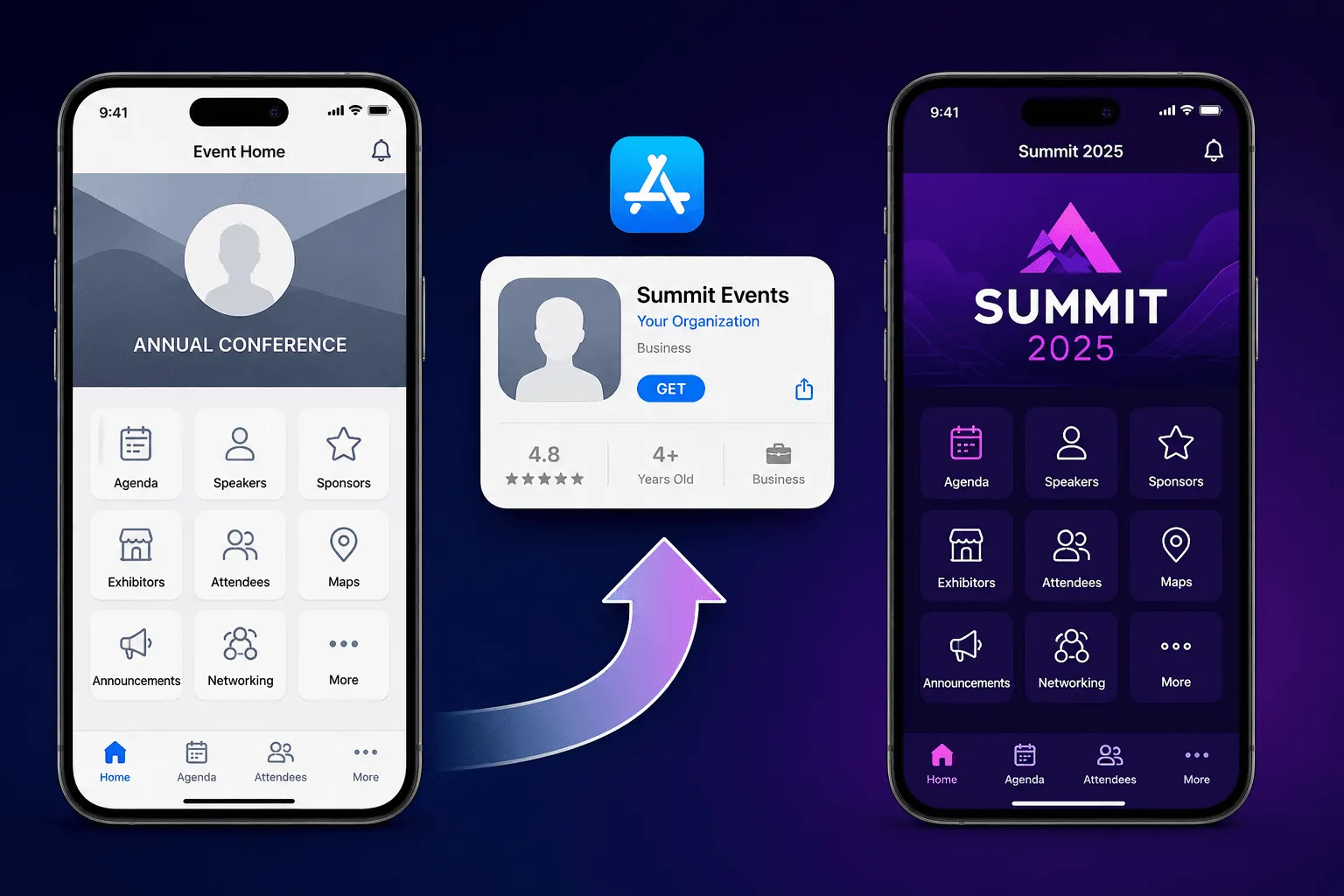
White label event app published under the organizer's own brand in the App Store

A white label event app (also written whitelabel or white-label) is a mobile event app built on a vendor's platform but published in the Apple App Store and Google Play Store under your organization's name: your icon, your app listing, your brand as the publisher, with zero visible vendor identity. The vendor supplies the engine. You supply the identity.


This guide covers what enterprise event teams, marketing teams, and agencies need to know before committing: the App Store rules vendors rarely explain upfront, real costs and timelines, the security questions procurement will ask, and the honest cases where white label is the wrong buy.

What is a white label event app?

The vendor's platform powers the features: agenda, event check-in and badge printing, push notifications, networking, and analytics. Your organization owns everything the attendee sees: app name, icon, splash screen, store listing, screenshots, colors, and fonts. The result behaves as if your company built the app, without your company hiring a mobile team, maintaining two codebases, or shipping iOS and Android updates every quarter.


If you are still deciding whether your event needs an app at all, start with what an event app does and when to skip one, then come back here.

White label vs branded vs custom vs native: what's the difference?

These four terms get blurred in sales calls. They mean four different things, and the differences decide your budget and timeline.


Model

Who appears as publisher

Time to live

Relative cost

Best for

Branded (container) app

Vendor

Days

Base plan only

Single events, tight timelines

White label app

Your organization

6-8 weeks first time

Base plan + upgrade fee

Recurring programs, flagship events

Custom-built app

Your organization

6+ months

10x+ a platform subscription

Apps that are products, not event tools

Native (a technology, not a model)

Either

N/A

N/A

Describes iOS/Android builds vs web wrappers


Branded (container) app. Your event lives inside the vendor's own app. Attendees download the vendor's app, enter an event code, and land in an environment carrying your colors, logo, and banners. Vendors also market this tier as a "custom-branded event app," and it delivers the in-app brand experience: personalized attendee schedules, sponsor banner placements, your identity on every screen after login. The store listing and publisher stay the vendor's.


White label app. A standalone app under your name. Your icon on the attendee's home screen, your name as publisher, your entire event series inside.


Custom-built app. An agency or internal team writes the app from scratch. You own the code, the roadmap, and every bug. Justifiable when the app is a product. Rarely justifiable for events.


Native app. A technology descriptor, not an ownership model. Native means built for iOS and Android specifically rather than a wrapped website. Ask vendors directly: "Is the white label app fully native, or a web view in a shell?" Native apps handle offline agendas, camera-based badge scanning, and push notifications more reliably, and Apple's reviewers reject thin web wrappers under their minimum functionality rules.

What actually gets white labeled?

A frequent misconception is that white label means everything is customizable. Here is the honest split.


Yours

Stays the vendor's

App name and subtitle in both stores

Underlying codebase and architecture

App icon and splash screen

Release pipeline (vendor builds and submits)

Publisher name (your legal entity)

Backend, hosting, security infrastructure

Store listing copy, screenshots, preview video

Feature roadmap

In-app colors, fonts, imagery, home screen layout


Push notification sender identity


The second column is the point, not a limitation. You are buying brand ownership without engineering ownership. The moment you want to change the architecture, you are shopping for a development agency, not a white label vendor.


For the feature layer itself, the evaluation list matches any event app purchase: offline agenda, push notifications, gamification, attendee matchmaking, lead retrieval, analytics. The full list is in must-have event app features.

What are the App Store rules for white label event apps?

This section is where first-time buyers get burned. Read it twice.

Apple's rule 4.2.6: the app must live in YOUR developer account

Apple's App Store Review Guideline 4.2.6 states: "Apps created from a commercialized template or app generation service will be rejected unless they are submitted directly by the provider of the app's content." Translation: a vendor cannot publish 50 client apps from its own Apple account. Your app publishes from your organization's own Apple Developer account.


Three consequences buyers discover too late:


  1. Your company must enroll in the Apple Developer Program. 99 USD per year. Organization enrollment requires a D-U-N-S number, a matching legal entity name, and Apple's verification. Budget two to four weeks if your company has never enrolled, and loop in legal and IT on day one.


  1. The vendor publishes through your account, not theirs. Good vendors run the submission as a managed service once you grant access. Ask who uploads the build, who answers Apple rejections, who holds the signing certificates.


  1. You keep the app if you switch vendors. The listing, download history, and reviews live in your account. A vendor offering to publish under their own account "to keep it simple" is proposing a 4.2.6 violation, and it means your app vanishes the day the contract ends.


One more detail from Apple's own clarification of the rule: the approved alternative for template providers is a single aggregated app, and Apple's example is "an event app with separate entries for each client event." The container model is not a workaround. It is the model Apple designed for this exact case.

What does Google Play require?

Registration costs 25 USD one time. Enroll as an organization, not an individual: personal developer accounts created after November 13, 2023 must run a closed test with 12 opted-in testers for 14 consecutive days before production access. Organization accounts are exempt from that entirely.

How long does store review take?

Apple states 90% of submissions are reviewed within 24 hours. Plan longer for a first submission. Rejections over metadata, privacy labels, or screenshots are routine, and each one restarts the clock. Both stores require a privacy policy URL and completed data disclosures. Your vendor should hand you finished templates for these.

Which changes need review, and which are instant?

Change

Store review needed?

Agenda, sessions, speakers

No, instant

Push notifications

No, instant

In-app design and content

No, instant

App name, icon, store listing

Yes

New SDK-level features in the app shell

Yes


This distinction is why a well-run white label app feels as flexible as a container app during event week itself.

The timeline, start to store

Step

Owner

Duration

Apple Developer organization enrollment (incl. D-U-N-S)

You + legal

2-4 weeks

Store assets, privacy labels, listing copy

You + vendor

1 week

Build and submission

Vendor

1-2 weeks

Review buffer for rejections

Both

1 week


Total: start 6 to 8 weeks before your event. Here is the failure we see repeat: a team signs the white label contract three weeks before its flagship conference, then discovers the company never enrolled with Apple. The D-U-N-S lookup stalls with legal, the event ships on a container app anyway, and the white label fee bought nothing but a lesson. Enrollment paperwork, not technology, is what kills white label timelines.

Should you choose a whitelabel app or a container app?

Teams default to whitelabel because it sounds premium. The better question is what the app must do for the brand versus for the event.


Choose white label when: you run a recurring program (annual conference, quarterly summits, roadshows) and want one permanent app attendees keep year over year; the event is the brand moment and a vendor's name on the download screen undercuts it; sponsors pay for app real estate and expect a branded property; or your legal team requires the app published under your entity.


Choose a container app when: it is a single event under roughly 500 attendees with no sequel planned; your timeline is inside four weeks; or the white label upgrade fee competes with budget for engagement features, in which case the features win.


The two work together as a program strategy: run regional events in the container, reserve the white label app for the flagship. Nunify's event app supports both paths on one platform, so upgrading from container to white label does not mean rebuilding event content.

What should enterprise teams demand before signing?

Procurement and infosec will ask these. Arrive with answers.


Data ownership. The contract states, in writing, that attendee data is yours, exportable in full at any time, and deleted on termination. Ask how export works: API, CSV, or CRM sync.


Certifications. GDPR compliance is the floor for events with international attendees. SOC 2 and ISO 27001 prove the vendor's security has been externally audited. Ask for the reports, not the badges.


Single sign-on. For internal and enterprise events, SSO through SAML, Okta, or Azure AD is a hard IT requirement more often than vendors expect. Confirm it covers both the attendee app and the admin dashboard.


SLA and event-day support. Get uptime as a number and named support coverage for your event dates. An app failing during the opening keynote is not a ticket-queue problem.


CRM integrations. Attendee and lead data flows into Salesforce, HubSpot, or Marketo without manual exports. If leadership wants event ROI reporting, this integration is where it lives.


API access. Your insurance policy for custom reporting and future workflows, even if unused on day one.


Store account ownership. Repeated deliberately: the app publishes from your developer account. This is exit protection.


These requirements separate an event app from an enterprise event app, and they earn a dedicated line in your RFP even when vendor marketing already claims them.

How do agencies manage white label apps across multiple clients?

Agencies face a multiplied version of every rule above. Three practices separate agencies that scale white label programs from agencies that drown in them.


One developer account per client, always. Apple's 4.2.6 applies per publisher. Each client enrolls in its own Apple Developer Program, and the agency manages builds through per-client access. A shared account puts every client's app at risk in one rejection.


Isolated client workspaces. Client A's attendee data, brand assets, and admin users stay invisible to Client B. Ask vendors exactly how isolation works and who sees what. Nunify's agency plan is built on isolated per-client workspaces with agency pricing, detailed on the pricing page.


A repeatable asset pipeline. Every submission needs the same package: 1024x1024 icon, splash screens, device-class screenshots, listing copy, privacy policy URL, data disclosures. Agencies that template this cut submission prep from a week to a day.

Which events actually need a white label app?

Three event types account for the bulk of white label deployments, each using the branded app differently.


User conferences and corporate summits. The app is part of the brand story from download to post-event survey. Personalized agendas and session Q&A run under the flagship identity, and the same app carries the event year over year, compounding downloads and reviews.


Trade shows and expos. The app is revenue infrastructure. Exhibitor directories, interactive floor maps, and QR-based lead retrieval live inside a property the organizer owns and sells against. Sponsors pay for placement in the organizer's app, not a software vendor's.


Recurring enterprise programs. Sales kickoffs, global town halls, and partner roadshows share one white label app across the calendar. Employees install it once, and every later event inherits the install base instead of fighting for a fresh download.

Is a white label event app worth it?

Not always, and vendors who say otherwise are selling, not advising.


The case for yes. Attendees search your event name in the App Store. An unfamiliar vendor brand on the result creates hesitation at the download screen, and download rate is the ceiling on every engagement metric inside the app. For recurring programs the app compounds: reviews, download history, and attendee familiarity carry into next year instead of resetting. For sponsor-funded events, a branded app is sellable inventory in a way a vendor-branded container is not.


The case for no. A one-time internal town hall for 200 employees needs a working agenda by Thursday, not a store presence. A timeline inside four weeks disqualifies white label on enrollment mechanics alone. And when the upgrade fee competes with engagement features, features win: Nunify data across 200+ events shows 60-70% of attendees arrive in the first 30 minutes, and it is check-in speed and engagement tooling that decide how that window goes, not the store listing. The Small Business Expo ran 319,000 registrations and a 1,473% engagement increase on a Nunify-powered event app, driven by gamification and instant check-in. The full case study is worth reading before you allocate budget.


Decision shortcut: white label is brand infrastructure, not an event feature. Buy it when the brand equation justifies infrastructure. Buy features when it does not.

What does a white label event app cost?

Budget four line items, not one.


Line item

What it covers

Paid to

Platform subscription

The base event app plan, priced by attendee volume and features

Vendor

White label upgrade

Per-app, per-year add-on covering submission and maintenance work

Vendor

Store fees

99 USD/year (Apple) + 25 USD one time (Google)

Apple, Google

Internal time

Enrollment paperwork, legal review, asset approvals

Your team (2-4 weeks elapsed)


The expensive mistake is comparing a white label quote against a container quote as if they were the same product. Compare the white label quote against a custom build: a development team, two platforms, permanent maintenance. The pricing logic becomes obvious.

What does AI actually do inside a white label event app?

Evaluate AI in scenes, not adjectives.


An attendee lands at your summit and opens your branded app. The matchmaking engine reads their role, industry, and session bookmarks, then suggests five people worth meeting before lunch, with one-tap meeting requests. During the keynote, another attendee messages the in-app assistant "where is the partner lounge" and gets the floor-plan answer in three seconds instead of hunting for staff. After the event, your team pulls an AI-generated engagement summary showing which sessions drove booth traffic, feeding the sponsor renewal deck.


All of it runs inside your branded app, under your name. When vendors pitch AI, ask exactly this: which attendee moment does it improve, and what does it look like on screen?

How do you evaluate white label vendors? The 10-point checklist

  1. Is the app fully native on iOS and Android, or a web view in a shell?
  2. Will the app publish from OUR Apple Developer and Google Play accounts? (Non-negotiable.)
  3. Who prepares store assets, privacy labels, and submissions, and who handles rejections?
  4. What is the realistic timeline from contract to live listing?
  5. Which changes need store review and which are instant?
  6. Can one white label app hold our entire event series?
  7. Data ownership, export, and deletion terms in the contract?
  8. GDPR, SOC 2, ISO 27001: certified, and can we see the reports?
  9. SSO, Salesforce/HubSpot/Marketo integration, API access?
  10. What exactly does the white label fee cost, and what does the base plan already include?

Frequently Asked Questions

  • A branded event app styles your event inside the vendor's own app: your colors and logo, the vendor's name in the store. A white label event app is a standalone app published under your organization's name in the Apple App Store and Google Play Store, with your icon, your listing, and no visible vendor identity.

  • The comparison is a category error worth untangling: native describes the technology (built specifically for iOS and Android), white label describes the ownership model (your brand on the vendor's platform). The strongest enterprise option is both at once: a fully native app, white labeled under the company's own developer accounts. The real decision is white label versus custom-built, and custom only wins when the app is a product in itself.

  • At minimum: app icon, splash screen, color palette, typography, home screen layout, banner imagery, sponsor banner placements, and push notification identity. In a white label app, customization extends to the store listing itself: app name, publisher name, screenshots, and description. Ask vendors for a brand-match demo using your actual brand guidelines before signing.

  • Platforms serving enterprise events support custom branding at two levels: in-app branding on standard plans, and full white label publishing as an upgrade. Nunify supports both, including publishing native white label apps to the Apple App Store and Google Play Store under your own accounts, plus a container option for events that need to go live in days.

  • Through three mechanisms: a separate Apple Developer and Google Play account per client (required by Apple's guideline 4.2.6), isolated per-client workspaces so data and branding never cross, and a templated store submission pipeline per client. Agency plans with per-client workspace isolation make this manageable at portfolio scale.

  • For recurring programs, flagship brand events, and sponsor-funded events, yes: the branded store presence compounds year over year and protects download rates. For one-off events under roughly 500 attendees or timelines shorter than four weeks, a container app delivers identical functionality faster and cheaper.

  • Six to eight weeks from contract in the standard case: two to four weeks for Apple Developer organization enrollment including the D-U-N-S number, one week for asset preparation, one to two weeks for build and submission, and a buffer for review rejections. Content inside the app updates instantly after launch with no review.