Blog

Effective Guide for Email Invitation For Event in 2023 [Tips , Examples, Templates]

image-alternative-text
Amarnath M

April 17, 2023

image-alternative-text

SHARE

Are you finding it difficult to create the perfect event invitation email?

Have you spent countless hours writing, deleting, reviewing, and editing, all in an effort to increase registration rates?

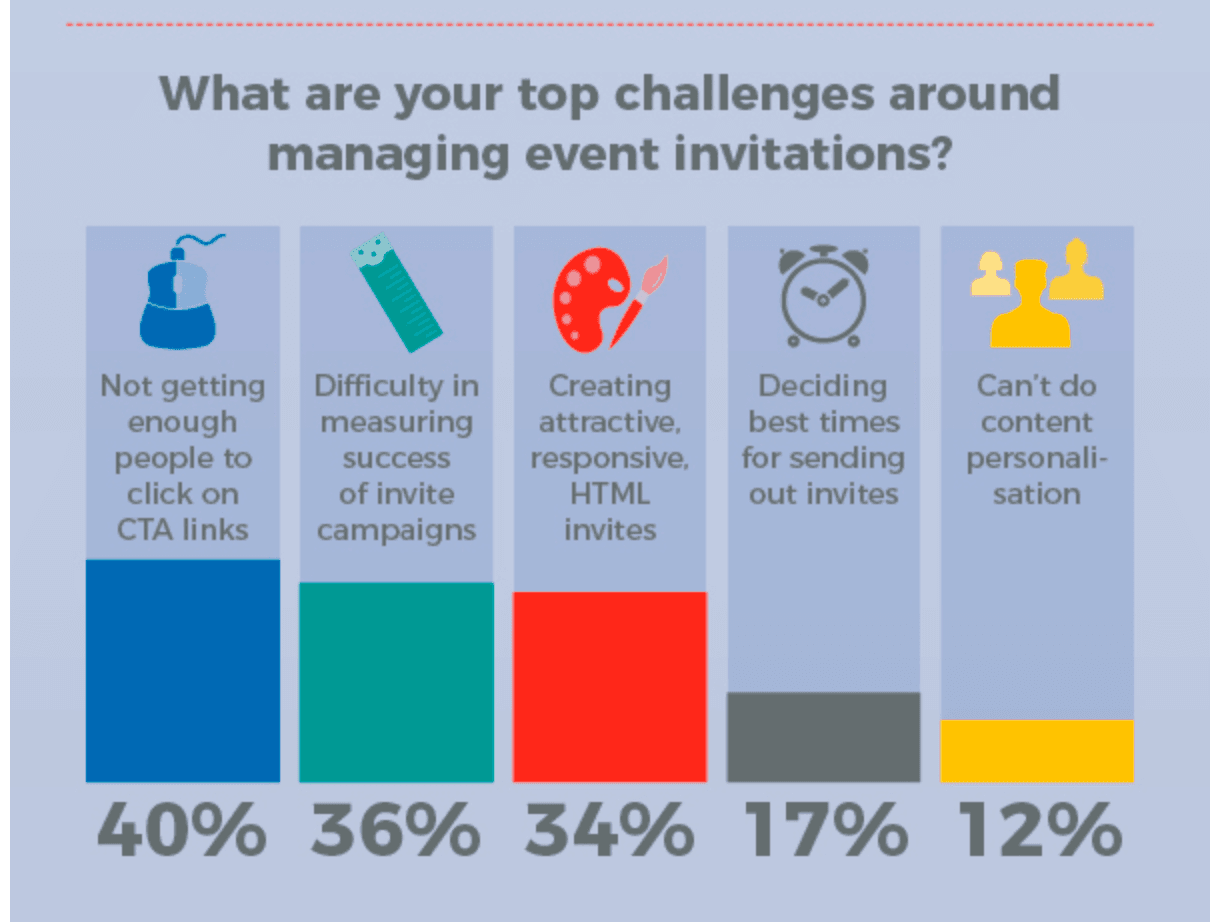
Do you face one of these below challenges in your email invitation for your event?

  • I am unable to get people to open the email invitation for the event
  • I am getting good open rates for my event invitation email, but NO CTA
  • I am not sure how effective is my event invitation email campaign
  • I am unsure when is the best time to send out invitation emails to get best responses
Chart showing the top challenges around managing event invitations
Source

After all, your event invitation email is the first communication your audience receives about your event, and you want it to make a great impression.

As someone who has been in the same position, I understand just how frustrating and nerve-wracking it can be to deliver e-mails at scale. Thus, I would like to share my past experiences and effective techniques with you.

I’ve structured this article so you can easily jump to the section that’s most relevant to you,

Skip to event email subject lines,

Skip to RSVP invitation examples that you can reuse

Skip to inspiring invitation email examples, or

Skip to event invitation email template.


How To Write An Event Invitation Email: 3-Step Formula

Writing an effective event invitation email isn't complicated, it's  about structure. Follow these guidelines, and you'll nail it every time.

Hook Them in the Opening

Start with something that makes people want to keep reading. Instead of "Dear John, we're hosting an event," try: "Join 500+ event planners who are ditching spreadsheets and actually getting things done," or "Guess who's speaking at our summit?" or "Only 10 spots left—are you one of them?"

Your opening line has 2-3 seconds to convince someone this is worth their time. Make it about them, not you. The best openers create curiosity (they wonder what you're announcing), urgency (limited spots, early-bird pricing), or exclusivity (you're one of 50 invited). We've outlined specific tactics for this in Step 1 below.

Deliver the Essential Details

Once you've hooked them, tell them what they need to know: date, time, location (or Zoom link), what they'll get out of it, and who's speaking/leading. Keep this section scannable—use short sentences, bullets, and bold headers. Don't bury the CTA. Put it early and again at the bottom.

We cover exactly what to include (and what to skip) in Step 2 below.

Give Them a Template

Don't start from scratch. Pick a template that matches your event type (formal business dinner, casual team lunch, virtual webinar, etc.), customize it with your details, and send. We've organized 13+ templates by event type in Step 3 so you can find exactly what you need in 30 seconds.

That's it. Hook → Details → Template. Follow this, and your event invitation emails will convert.

Step 1 : Catchy Invitation Email Subject Line

Email Subject lines are so critical, yet always overlooked.

Did you know 47% email recipients will open an email based on subject line while 69% will report SPAM based on your subject line – Source.

image-alternative-text

Hence do not rush when crafting your email’s subject line. Take your time to create an attention-grabbing one.

To help you with this, I have listed my 5 mantras that I have successfully used

  1. I keep the subject line to 6-10 words
  2. You should create FOMO – either time sensitive or create a sense of exclusivity
  3. Include personal name – You will automatically see a huge jump in open rates
  4. I use emojis, but only if its relevant
  5. Add a fact or historical statistics

This is a list of Invitation Email Subject Line that I have come across and continuously update.

  • Explore <Topic> at <Event Name]
  • [X] Weeks to Register 👀
  • You’re invited: Come learn about [Event’s objective] at [Event Name]
  • Achieve More at [Event Name] by [Event benefit] – Join our upcoming Event
  • [X] things you can do at [Event Name] 😃 👇
  • Unlock the secret to [Your Event’s objective]
  • See who’s speaking at [Event Name]
  • 3 Days To Go: [Event Edition] ⏰
  • [First Name], don’t miss out on early bird tickets for [Event edition] – ends tonight
  • Reserved for you, [First Name]- Be the first to register to win prizes
  • [Product Launch] alert : New features and exciting updates – Register now
  • Your Exclusive Invite [First Name] to [Event Name] 🤫
  • You’re invited to our flagship event ✉️
  • You’re invited to a groundbreaking event on [Your Event’s objective]
  • Join us for [Event name] in [time until event]. We’re pumped! – Are you ?
  • We’re thrilled to invite you to [Event name]. You won’t want to miss it! 😉
  • The wait is over [First Name], for [Event name] [Year] – Register now
  • [Key note Speaker Name] has accepted her/his invite for [Event name] – Have you?
  • [Event name] [Year] is here. Details inside
  • Final day to get your Exclusive VIP Tickets
  • Need help with [Event’s objective] ? Join us on [Event date] at [Event venue]
  • Guess what’s happening on [Event date]?
  • [First Name], secure your spot now before it’s too late. ONLY 10 seats left! ⏲️
  • Hey [Name]! Guess what? You’re officially invited to [Event name]
  • Get ready for an unforgettable time! 😎🎉 at [Event Name] – Register now
  • One day left to register for [Event Name]
  • Event Alert ⚠️ 🚨 📣 – The secret(s) to [Event Objective] – Register to discover
  • We’re back after X years 🎉 – Join us [First Name] of [Event date]
  • Guess who is coming for [Event Name] – Come see her/him on [Event date]
  • Make a Difference: Attend [Charity Event Name]
  • [Event Objective]. Interested?
  • [Event Name] Sale – Tickets are limited!

Step 2 : What To Include In Your Email Invitation For Event ? – And What NOT To Include

Fantastic! We have some amazing subject lines to pick from, now let’s move on to crafting the body of the email.

The goal here is to cover all critical information and persuade the reader to register or RSVP. 

An effective way to keep your guests excited for the event would be to send drip email campaigns that reveal more exciting details about the product launch. Always keep each email more exciting than the last as this helps to build anticipation for your event.

Here’s the list of key information to include in the body of the event email invitation

Time, Date & Day : I often see email marketers forget to include day of the week. So do not forget to include it since it is one less step for your target audience to make a decision.

Venue Information : If you haven’t finalized the venue yet, at least mention the area you are targeting. If it’s a virtual event or webinar, clearly list the platform; this will help your guests become more comfortable with it sooner.

Highlights & What to expect : This is your make-or-break invitation. Try to keep it concise and focus on why they need to attend. My suggestions for you are: add last edition’s numbers, include testimonials, or simply list three benefits the attendee can get by attending the event.

Teasers : Whether it’s a big reveal of a keynote speaker or a sneak peek of a product launch, teasers will help you move your guests closer to taking action in the present.

CTA to register/RSVP : Your CTA should be clear and visible. If your invite is long, then place it in multiple sections. You can get creative with your CTA’s by focusing on value instead of action. For example instead of “Register now” you could say “Ready to Join the Fun?”

Other essentials : Signature, any restrictions or prerequisites, event website, social media handles, and mobile event app links.

Avoid these

🚫 Avoid using one image only for the event invitation email. I’ve seen multiple events reuse their event invitation letter print image in the email. It usually is not responsive and looks off in a mobile or tablet.

🚫 Do not overdue your visuals. Yes visual and videos have an impact but treat this as a transactional email, not a promotional email. Limit your visuals to 3-4 that carry the message of your event.

🚫 Do not ask for referrals in this email. The focus of the email invitation for the event is to Register/RSVP. Once they do so then you can reach out to them to ask to refer to a friend or colleague

🚫 To avoid your email going to SPAM refrain from excessive use of capital letters, punctuation marks, and commonly used spam words such as “free,” “win,” “euro,” “$,” “sex,” and so on.

🚫 This one is an obvious one but ensure you do a spell and grammar check. Here is a list of tools you could use.

🚫 Strictly avoid scripts, and sanitize your HTML if you are using it.


Step 3: Invitation Email Template

Each event is unique. Therefore, I have categorised each of the below invitation email template. These categories are based on the purpose of the event (use-case) and the stylistic approach of the invitation. Below, you’ll find a detailed index designed to assist you in selecting the perfect invitation email template.

Corporate Event Invitation Email Best Practices

Corporate event invitations carry more weight than casual ones. You're inviting people on behalf of a company, collecting legal data (dietary restrictions, accessibility needs), and often managing external stakeholders. Here's how to do it right.

Why Corporate Invites Are Different

Corporate events require confirmation and accountability. You need headcounts for catering, dietary information for inclusivity and legal compliance, plus-one information, accessibility requirements (wheelchair access, ASL interpreters, quiet rooms), and sometimes dress codes. Your email needs to collect this information while still feeling warm and professional.

Tone & Language

Use a professional but approachable tone. Avoid robotic language ("You are cordially invited to attend...") and corporate jargon. Instead: "We'd love to have you join us for our annual awards dinner on October 15. It's a chance to celebrate our wins and connect with the team." Personalize the opening, reference past conversations, their team's achievements, or why they're specifically valuable to have there.

Essential Information to Collect

Always ask for: 

  •  Dietary restrictions and allergies - critical for catering and inclusivity. 

  • Plus-one information - many corporate dinners allow partners or guests; clarify policy upfront. 

  • (Accessibility needs - ask "Will you need wheelchair access, dietary accommodations, or other support?" Make it easy to respond via checkbox, not open text. 

  • Attendance confirmation - use RSVP dates with teeth ("We need counts by Friday for catering").

Dress Code Clarity

Don't assume people know what "business casual" means. Define it: "Business Casual: dress pants/skirt + blouse/shirt, no jeans or sneakers" or "Black Tie Optional: formal attire encouraged, business attire welcome." This prevents awkward moments and shows you've thought about your guests' comfort.

Include Decision-Makers & Speakers

Mention who's speaking or attending in an executive capacity: "Join our CEO, Jane Smith, and award-winning speaker John Doe as they share..." People want to know who they'll be with. Include headshots if possible. It makes the event feel real.

Follow-Up & Reminders

Send a reminder email 3 days before to confirmed attendees. For corporate events, include parking directions, coat check info, agenda (if not shared), and a contact name/phone if they have questions. This prevents no-shows and logistical chaos.

Use RSVP tracking or an event registration system so you can sync dietary needs, plus-ones, and accessibility requests directly to your catering partner and event venue. Don't rely on email replies—data gets lost, and you'll have surprises on event day.

Simple And Short Invitation Email For Event

Hello [First Name],

Are you ready to join us for an unforgettable event?

We invite you to join us for [Event Name] hosted by [organizer] on [date and time] at [location].

You are on top of our invitee list. At this event, you’ll have the opportunity to [briefly mention key event highlights/benefits].

Don’t miss out on this opportunity to [event goal]. Register now and book your spot on the VIP list.

[Registration button]

We can’t wait to see you there!

Invitation Email Template For Conference

Are you tired of attending conferences that leave you it was a waste of time?

Well, get ready for something different. We’re thrilled to invite you to [Event Name]. Since it is our [Number of edition] edition we’re breaking all the rules and taking the experience to a whole new level. Trust us, you won’t want to miss it.

We have lineup of renowned speakers, informative sessions, and exciting networking opportunities. Here is the initial lineup

[Add few teasers]

So register now and book your calendar for [Number of days of event] – [Date] at [Venue] in [City].

[Registration Link]

Business Event Invitation Email Sample

Hello [First Name],

I’m thrilled invite you to our upcoming business event, [Event Name]. This year, we celebrate our [number]-year anniversary.

As a valued business partner, you have always been a part of our success, and we would like to celebrate with you at a formal dinner followed by cocktails on [Date] at [Time].

I am also excited to announce that [Name], a well-known expert in [industry], will be joining us to share insights and strategies on [topic]. I am sure you will find their presentation informative and engaging.

My humble request is that you RSVP and provide us with your food preferences to help me and my team plan the event better.

Choose Food Preferences [RSVP Link – CTA]

We can’t wait to celebrate with you!

Lunch Invitation Email Template

I would like to invite you to join us for a delicious lunch. I have booked a table at [Restaurant Name] on [Date] at [Time].

It’s a wonderful opportunity to catch up with each other over some great food. The restaurant specializes in [Insert cuisine], and you can check out the menu at [menu link].

The restaurant recommends [insert dress code] as the dress code, and you can find directions to the restaurant here: [insert Google Maps directions link].

The bill will be split amongst everyone attending. You can RSVP by [RSVP Date] and I will take care of the rest.

I look forward to seeing you there!

Party Invitation Email Sample

Key out here is to keep it short and use visuals. If there is a dress code or a cocktail party theme ensure you call it out. Another important thing to call out if there is BYOB

Are you ready to party ? [Date] is [reason for celebrating]. 🥳🙌🎂 🍰🎈🎉 🎁

And I would love for to join [me/us/company] to celebrate with us. We’ll have delicious food and cocktails, so all you have to do is show up and have a good time.

The theme is [Insert theme] and dress code for the guys is [men dress code] while the ladies

So let’s dance the night away! Can’t wait to see you.

Almost forgot – Don’t forget to RSVP 🙏🏻 [Insert RSVP link]

Holiday Party And Christmas Party Invitation Email To Employees

Ho ho ho! It’s that time of the year again. 🎄🎅🏻🦌

We have plenty of festive surprises and exciting activities in store for you, including the long-awaited Secret Santa reveal. It’s finally time to find out who your Secret Santa is and exchange gifts!

This year it’s “Ugly Sweater Outfit” theme! It’s time to dust off those ugly sweaters and get creative. Make sure to wear the most outrageous, tacky, and over-the-top sweater you can find. ☃️

The [Company name] christmas holiday party will take place on [Date] at [Time] in the [Venue Name].

Plus one’s are welcome. Please RSVP by [Date] and let us know if you have any dietary restrictions.I am getting married !

Wedding Invitation Email Template

I am getting married ! 👩‍❤‍👨💍

As most of you know, [write a personal story on how you met or history]

It’s exciting to know the journey is just about to begin. And to witness the start of it, we would love for you to be with us on our special day.

The wedding is on [wedding date] and the reception is on [reception date]. [Please add other dates]. I am attaching the specific venues but the city is [City name]

So block these dates, book your tickets, get your leave sanctioned, make your excuses with your boss…. whatever you need to do, to get moving !!!

You guys NEED to be here and that will be the best gift to us.

P.S : Please RSVP so we can make accommodation arrangements.

Love and looking forward to seeing you at the wedding.

Fundraising Event Invitation Email for Inviting People to a Charity Event

Hi [Name],

We would like to invite you to join us for our annual charity event. This year, we are raising funds to support [Charity]. Your participation will help make a difference in the lives of those in need.

The event will take place on [Date] at [Time] at [Location]. There will be food, drinks, and entertainment provided.

Tickets are $[Amount] per person and can be purchased online [ticketing link]. All proceeds will go directly to [Charity]. We hope to see you there.

Invitation Email Template for Networking Event

I highly recommend you make it a visual template for networking.

You are invited !

Join us for an exclusive invite-only networking social event on [Date] at [Venue]

We are extending this invitation to only [number] thought leaders and professionals, including yourself.

The agenda for the evening:

  • Engaging conversations, where you can share insights and experiences, and
  • Build new connections with other like-minded individuals.
  • Learn about our [project or product name]
  • Beer, wine, hors d’oeuvre and to end with a sit-down dinner

Don’t miss out [First Name]

RSVP by [FOMO date]

Farewell Party Invitation Email Template to Colleagues

The day has come to bid Adieu to [Colleague’s Name].

As a token of appreciation, we would like to organize a farewell lunch for [Colleague’s Name] on [Date] at [Time] at [Restaurant Name]. The bill will be split among all attendees, so please bring cash to make the process smoother.

As a team, we’re also pooling together to buy [Name] a special farewell gift. If you would like to contribute, please let me know.

Please RSVP by [Date] so we can finalize the reservation.

Virtual Product Launch Invitation Email Template

Hi [First Name],

I would like to personally invite you to our flagship online keynote, [Event Name – like the event website], on [Date]. Streaming from [Venue], you’ll hear about our vision for unlocking the power of [Product Name]. We’ll dive deeper into the future of [Vertical], as well as share our vision for [Vertical trend] and the practical ‘how-tos’.

Keynote highlights include:

  • [List out 3-5 highlights – You could use images to highlight]

Register now

P.s. If you’re not able to join us, be sure to register and we’ll send the recording your way.

Webinar Invitation Email Template

You can explore here other webinar email templates

We are delighted to invite you to our upcoming webinar on [Topic] taking place on [Date] at [Time]. This is a unique opportunity to join a thought-provoking discussion with industry leaders and experts, gain insights into the latest trends, and learn about best practices.

At [Company/Association], we strive to bring together the best minds in the industry to share their knowledge and experience. Our webinars are designed to provide you with actionable insights, strategies, and tools that you can implement immediately to drive results and achieve your business goals.

This edition of our webinar series will focus on [Topic]. Here are some key highlights:

  • A panel of industry experts sharing their insights and best practices
  • Interactive Q&A sessions with the speakers
  • Exclusive access to resources and tools to help you drive results
  • Break out reports for networking opportunities with other professionals in the industry

To register for the webinar, simply click on the link below and fill in your details. Once you have registered, you will receive a confirmation email with all the details you need to join the webinar.

[CTA button – Register Now]

We look forward to seeing you at the webinar and to having you as an active participant in this exciting event.

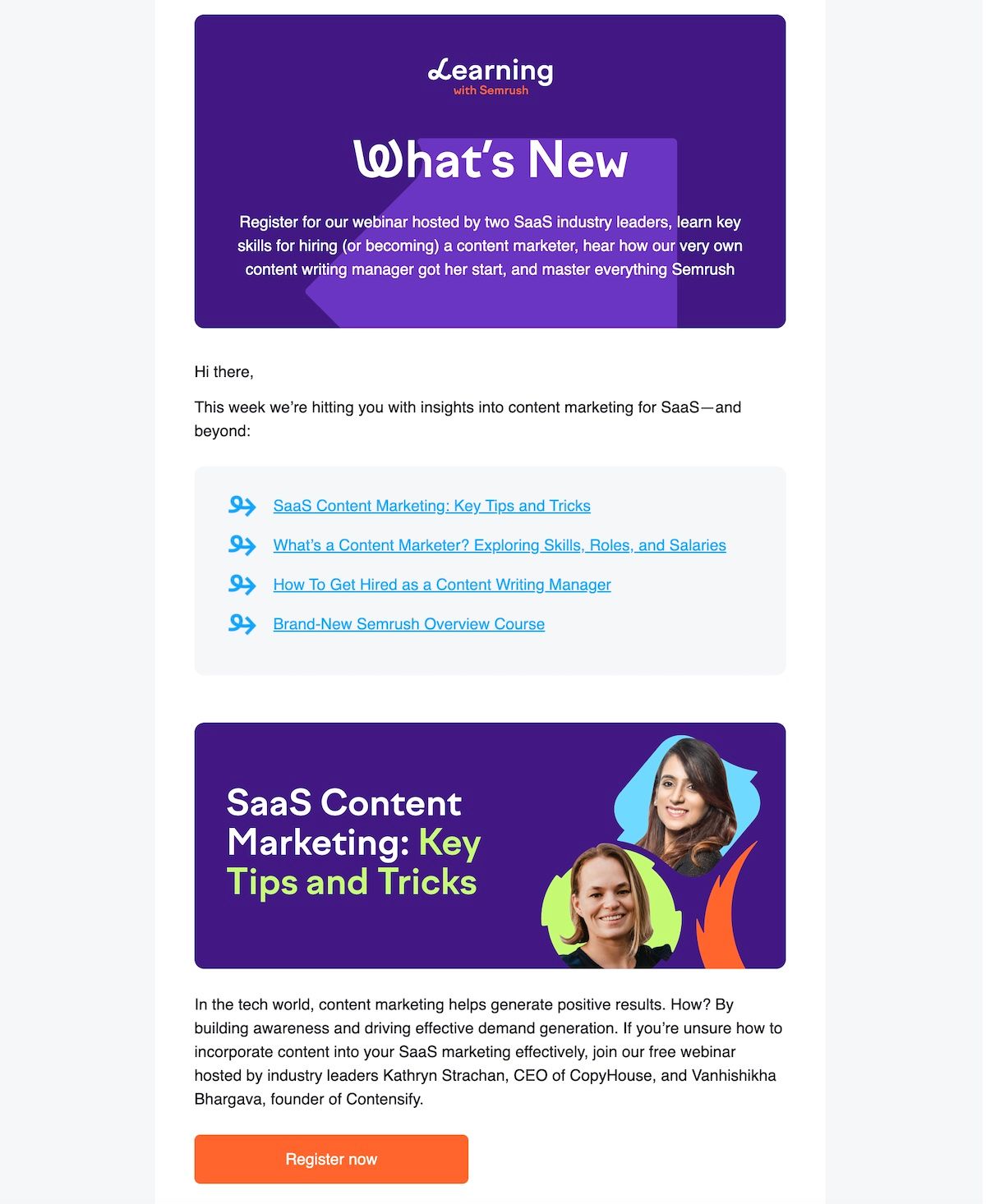
Here is an example of a webinar invitation email from Semrush.

Sample invitation email to attend a webinar

Zoom Invitation Email Template

I look forward to you joining for our virtual gathering on Zoom. I have also provided the calendar link The meeting ID and password are included below:

Date & Time : [Insert Date & Time]

Meeting ID: [Insert Meeting ID]

Password: [Insert Password]

[Insert Add to Calendar Link]

To join the meeting, simply click on the link below and enter the meeting ID and password:

[Insert Zoom Meeting Link]

If you haven’t used Zoom before, I request you to download the Zoom app on your computer, tablet, or smartphone for free. If you have any questions or need assistance, please don’t hesitate to reach out to me.

RSVP Invitation Sample to Reuse

Example 1 : Intercom RSVP Invitation Sample For Webinar

Sample RSVP invitation email

What I liked about this rsvp invitation:

  • I appreciate the personalized tone of the email, particularly the use of “we” and “you,” which creates a sense of connection and makes the message feel more customized rather than a generic mass email.
  • I love short emails that are to the point. The sentences are crisp and neat. They avoid using too many words and lists out the benefits in a concise manner.
  • Notice the use of bold text. They keep it specific to the time . I also love that it shows different timezones.
  • The email effectively highlights the call-to-action by including a link to register and a supporting case study on why attending the webinar is important, making it relevant and prominent.

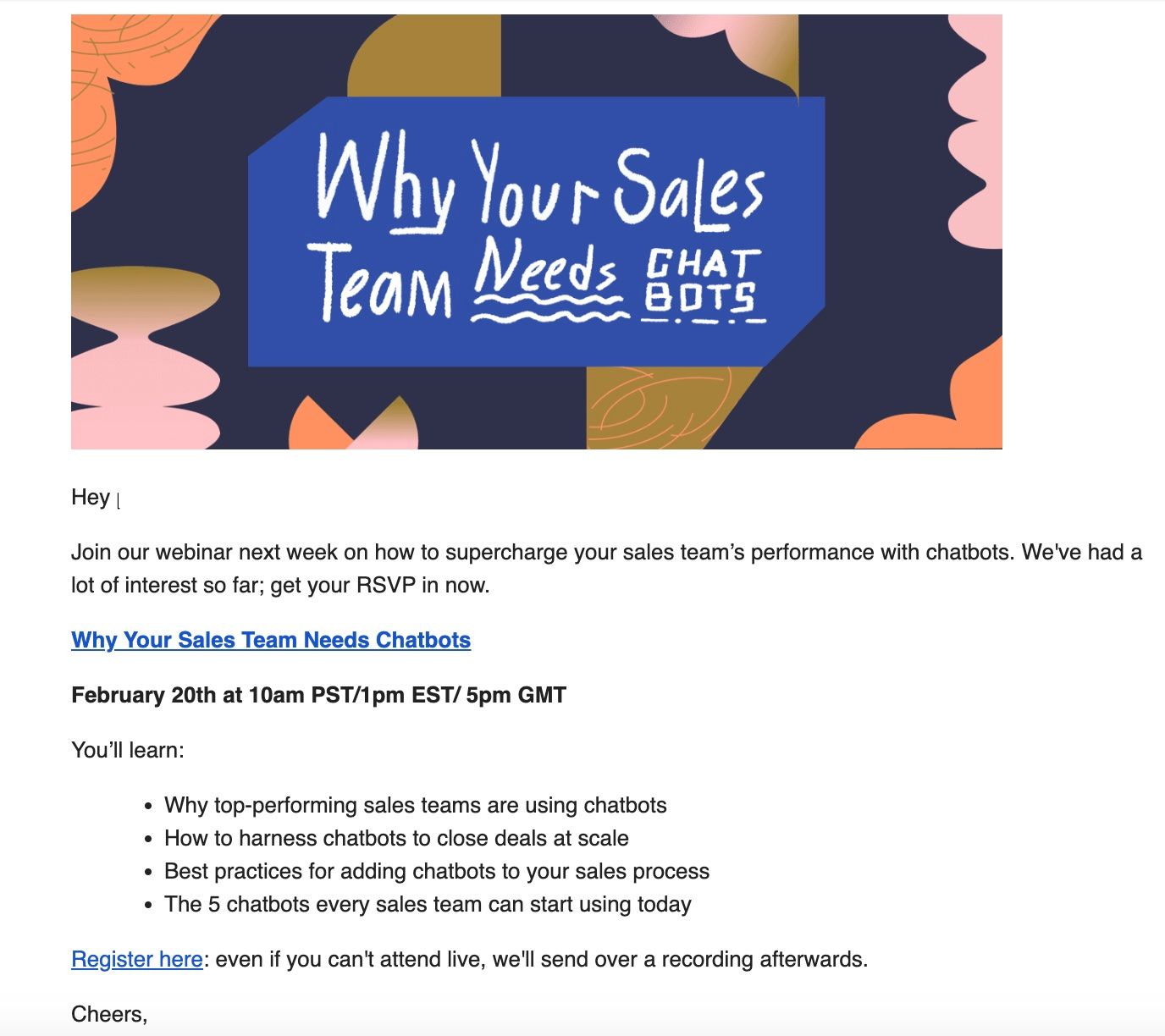
Example 2 : RSVP Invitation Sample For AI-Marketing Event

What I liked about this rsvp invitation sample:

  • Super-simple. Sometimes Less is really MORE
  • RSVP invites needs to be very personal and relatable. Here the sender immediately is able to connect with reaching out by first name.
  • The use of the words “you” and “I” makes it feel very conversational
  • The agenda is quite clear and catchy considering given the buzz of Chatgpt
  • The sender also points out how you can email back in case the reader has any questions.

Inspiring Examples of Email Invitation For Event [Updated regularly]

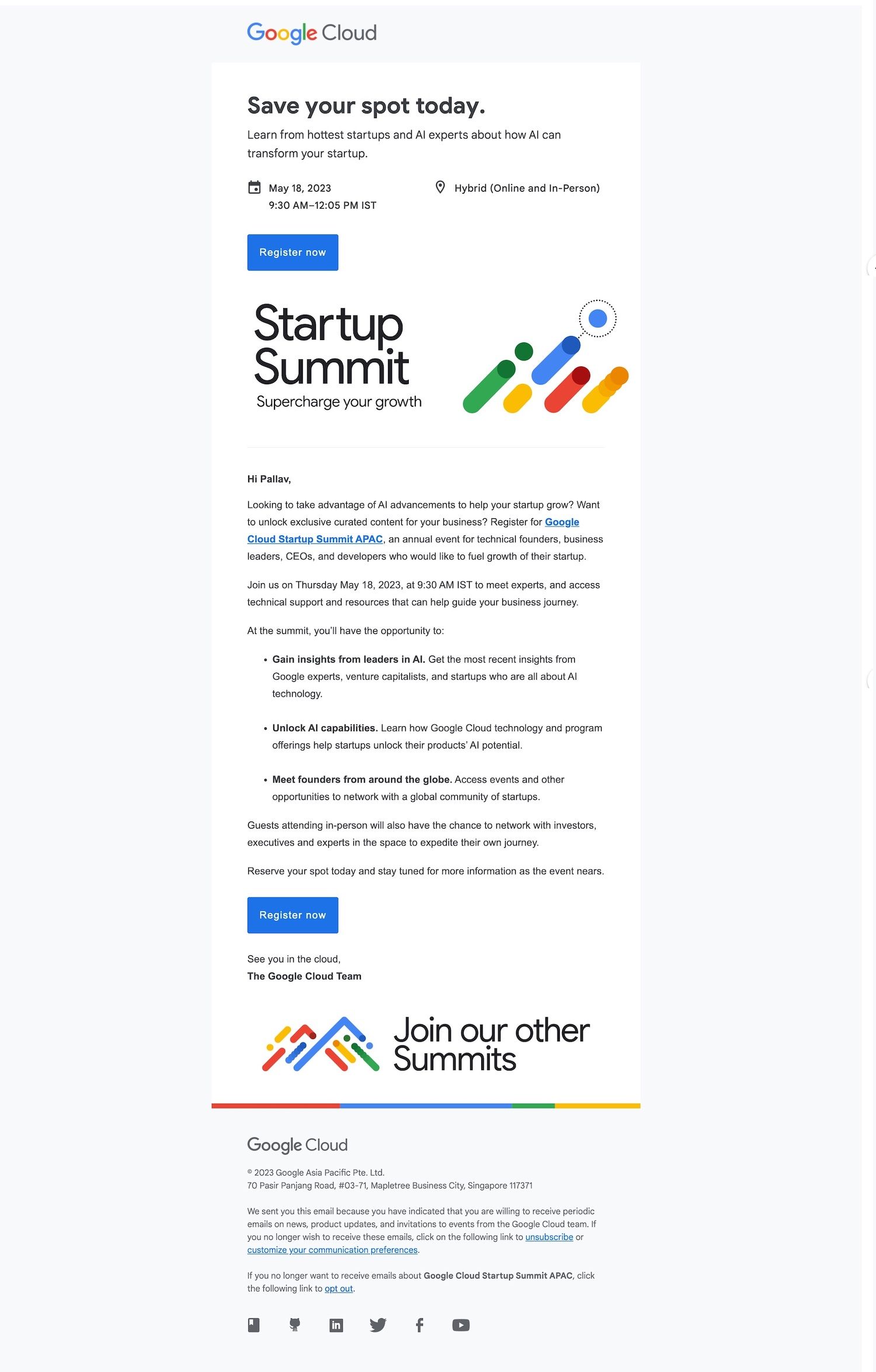
Example 1 – Google Cloud Summit Invitation Email Sample For Event

Sample invitation email to attend an event

What I liked about this invitation email sample for event:

  • Amazing use of font. They have highlighted very clearly the 3 key takeaways
    • Save the spot today
    • The topic of the event – Startup Summit to supercharge growth, and
    • Join our other summits
  • They also have used bold to highlight the key points of the event
  • The use of color has been done brilliantly.
  • Great use of CTA is 2 places – one at the top of the email and the other at the bottom. I have seen so often people ignore the bottom of the email
  • A brilliant visual that catches the eye – it is minimalist yet impactful.

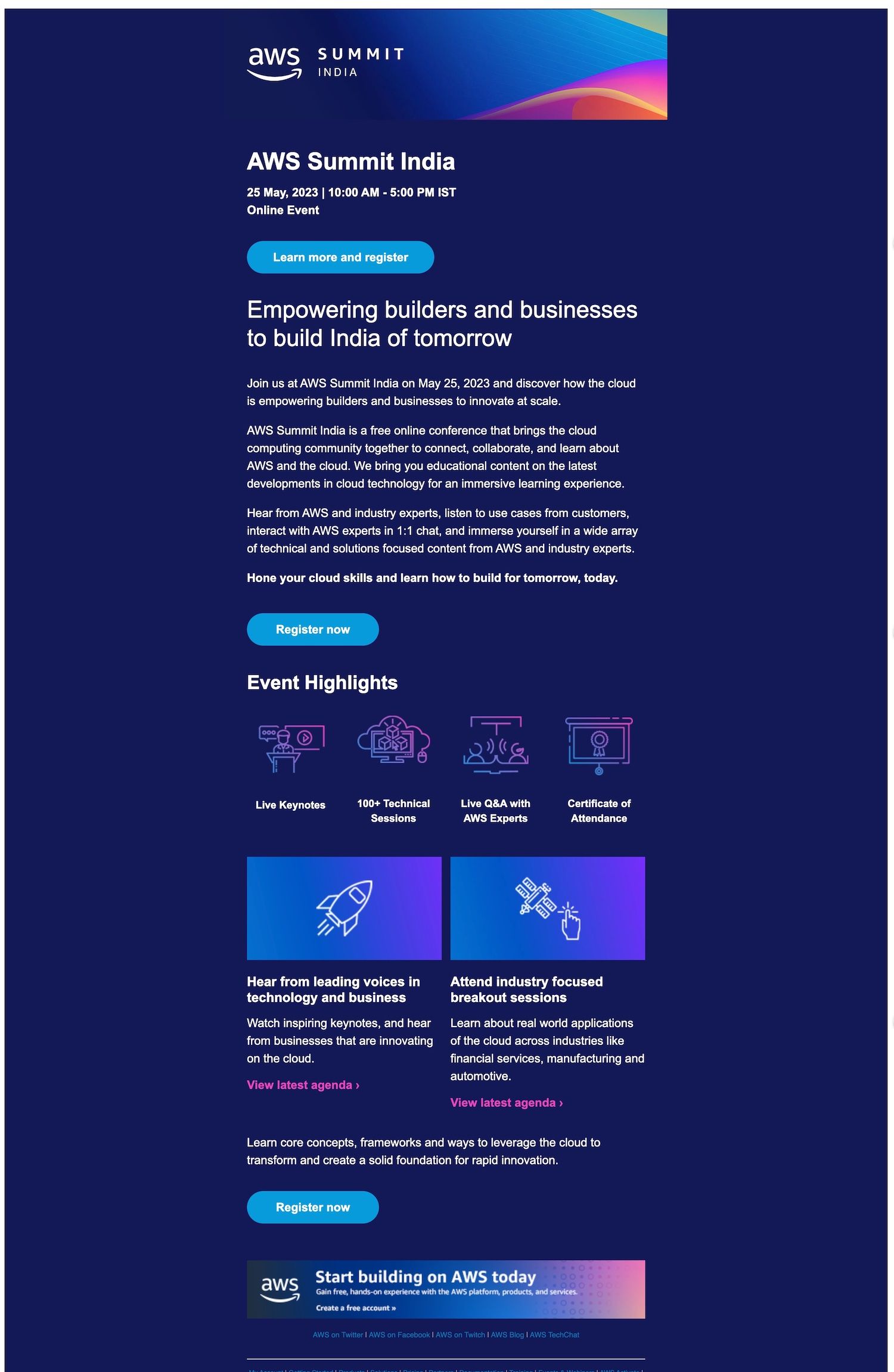
Example 2 : E Invite To Attend AWS Summit

Sample invitation email to attend a summit

What I liked about this e invite to attende AWS Summit:

  • The colors are very vibrant. It’s a sharp contrast to the above Google Cloud Summit Invitation Email
  • An amazing use of multi-color icons that crisply showcases the highlights of the event
  • I also like that they have provided links to see the event agenda. I would recommend you to include an agenda link on every email you send – even if it is yet to be finalized. Or you could just send last year’s agenda !
  • The CTA buttons are well spaces so it give the reader enough reminders to register
  • The break in contrast towards the end with a display ad effect is just amazing.
    • Save the spot today
    • The topic of the event – Startup Summit to supercharge growth, and
    • Join our other summits

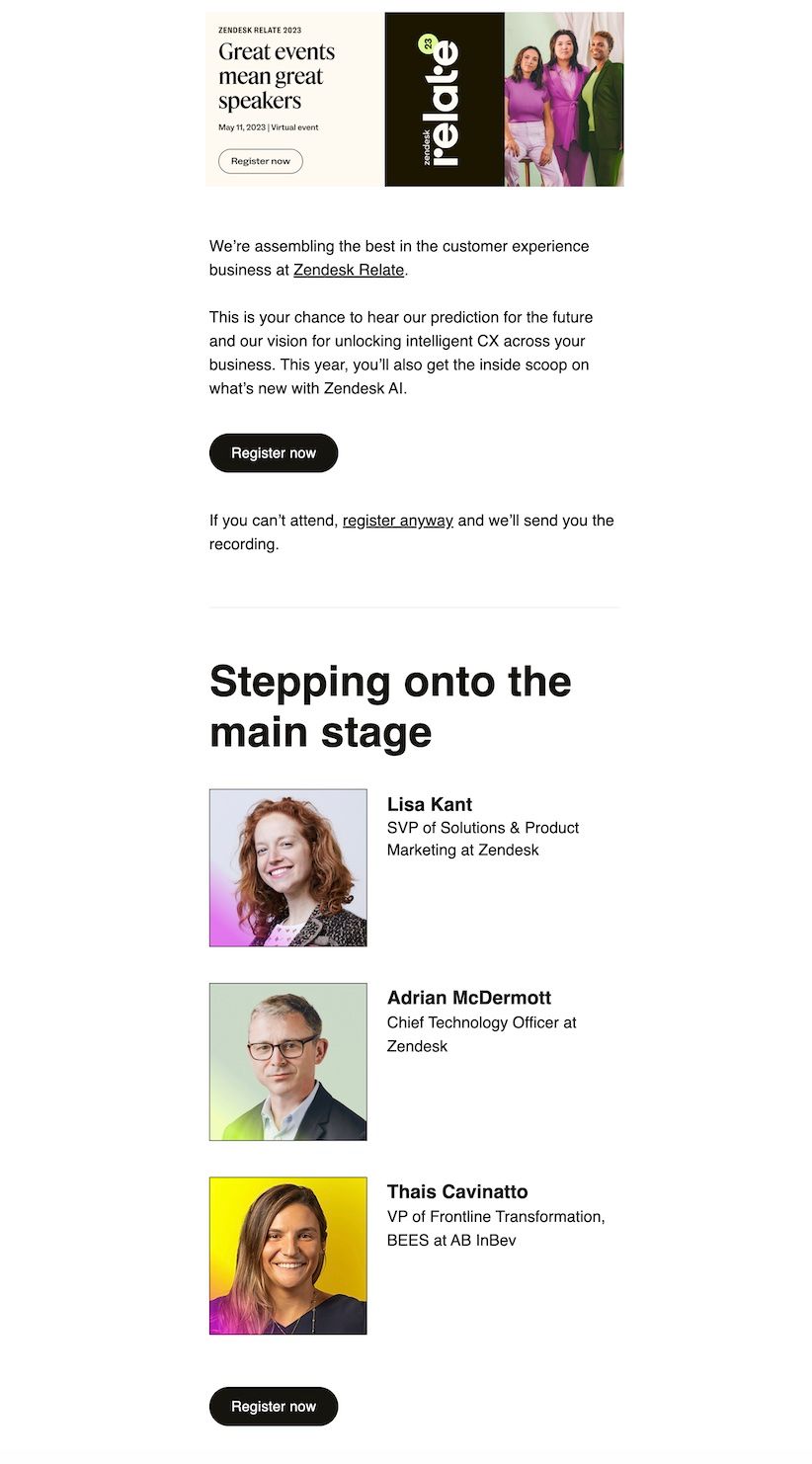
Example 3 : Zendesk Business Event Invitation Email Sample

Business event invitation email sample

What I liked about this business event invitation email sample:

  • I love the tagline – Great events mean great speakers . It’s catchy and setups the emailer
  • They have put their speakers in front and center. I have seen using your key attractions as the primary focal point in email invitation emails can spike registrations.
  • The email is concise. It doesn’t make the email too bulky to read
  • Great use of CTA is 2 places

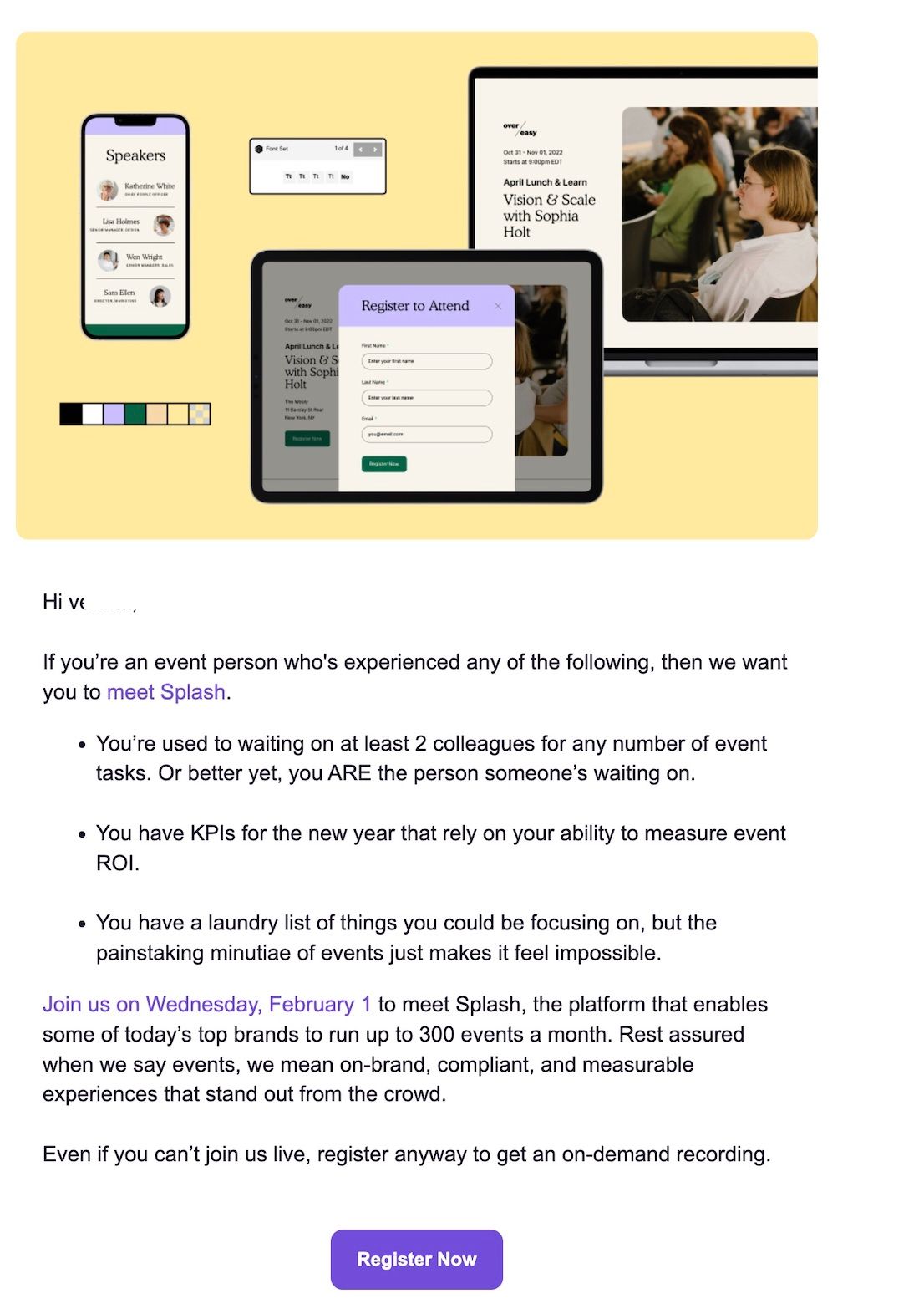
Example 4 : Splash Event Invitation Email On How Brands Need To Use Event Tech

Sample invitation email for product launch

What I liked about this invitation email example:

  • The visual is eye-catching and effectively conveys the event’s purpose.
  • The introduction is attention-grabbing and directly addresses the challenges that the target audience may be facing, making it more compelling to register for the event.
  • The tone of the email is friendly and approachable, so already sounds like a fun event
  • The inclusion of an option to access a recording of the event even if one cannot attend live is a thoughtful and practical touch.
  • Lastly, a very clear and clean call-to-action button

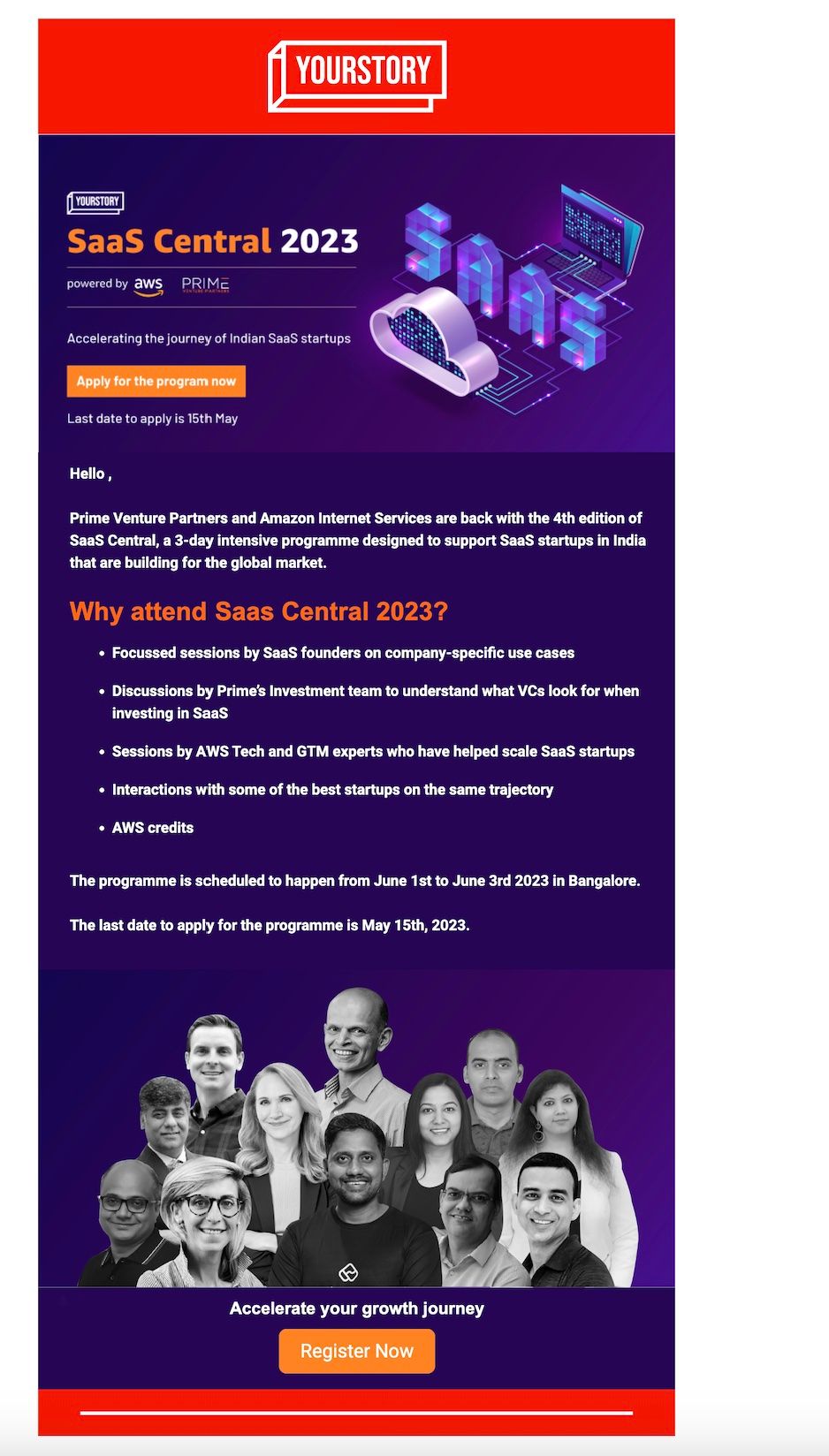
Example 5 : Yourstory Formal Invitation To Attend Event

Sample invitation email to attend an event

What I liked about this formal invitation:

  • The colors are catchy. Think of it as a dark-mode email
  • Your story has integrated sponsors at the top of the email. Such a strategy is especially helpful if you have a key sponsor in your event sponsorship packages
  • Very clearly lists out on why to attend the event
  • The use of people towards the end is a great idea to reuse.

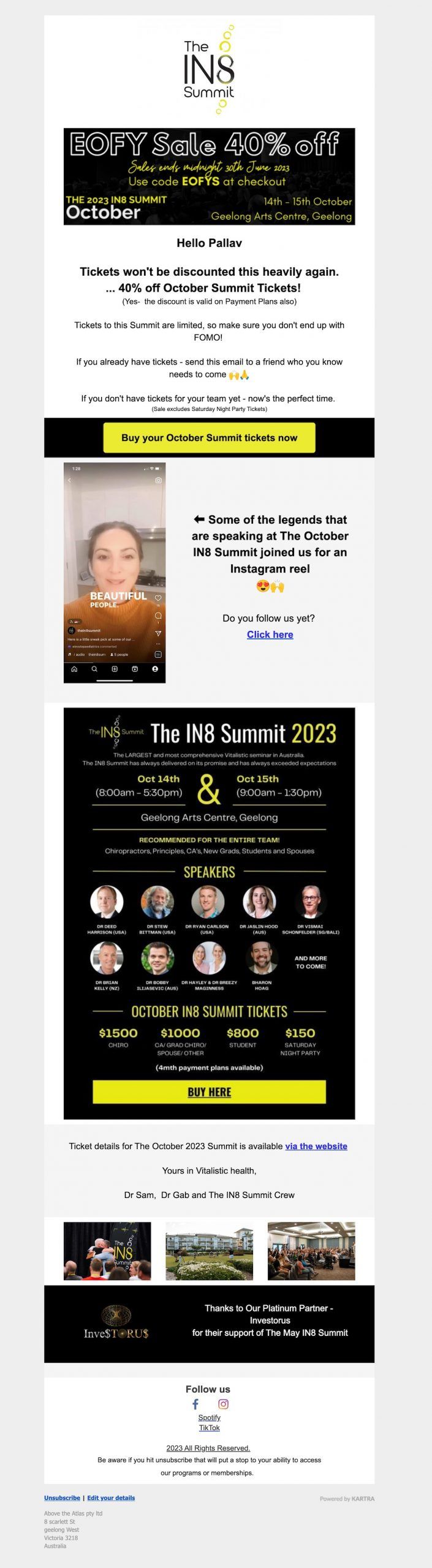
Example 6 : Invitation Example From The IN8 Summit Tickets Are Limited

Sample invitation email to attend a summit

What I liked about this invitation example:

  • An amazing introduction with a hook of a sale on tickets
  • Very fun language and visuals – Your invite email need to be boring
  • The use of emoji’s creates a fun element to the email
  • Lastly, they did not ignore including their platinum partner in the email.

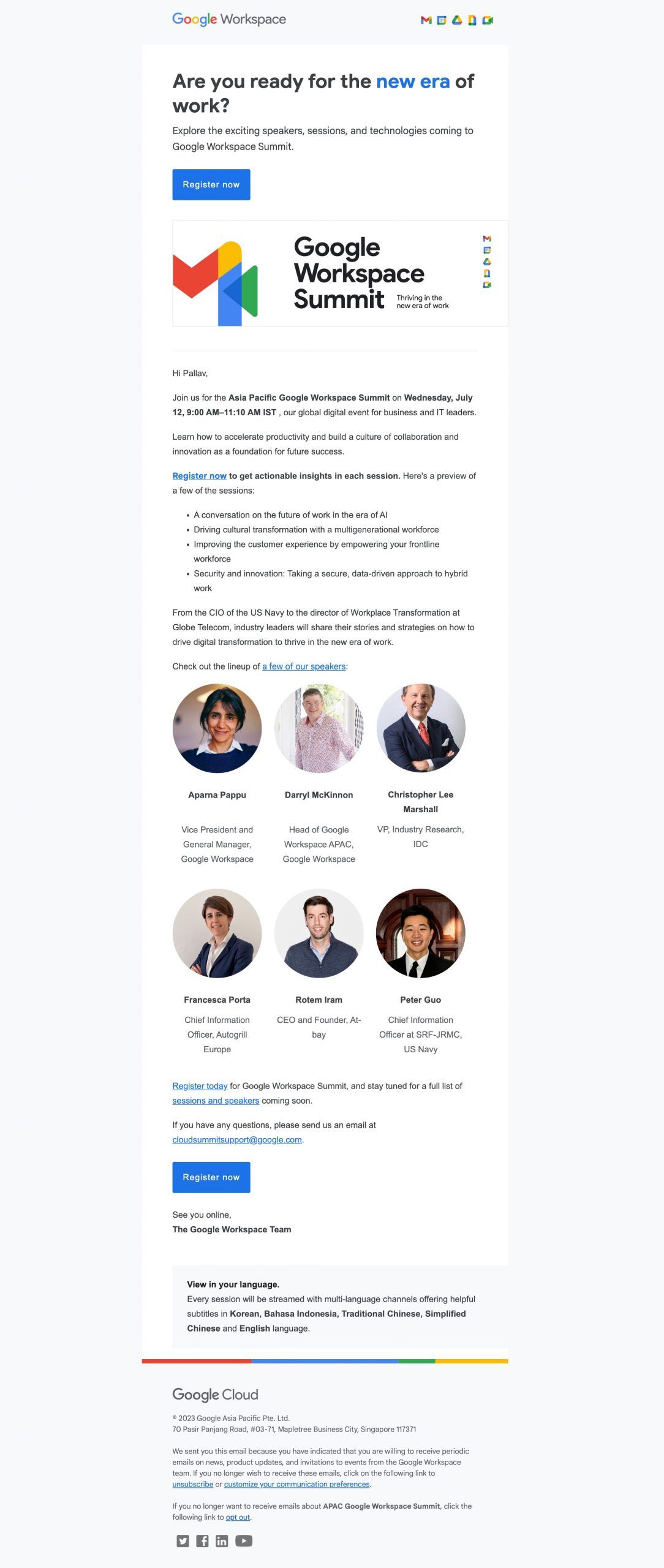
Example 7 : Google Formal Invitation To Attend Summit

Sample invitation email to attend a summit

What I liked about this formal invite:

  • They use BOLD to highlight salient points of the summit
  • The introduction of the email is a question. A question will encourage your invitee to read further
  • The focus in this invite is the speakers, which they put front and center on why you should attend the summit.
  • The fact that they talk about multi lingual support is incredible

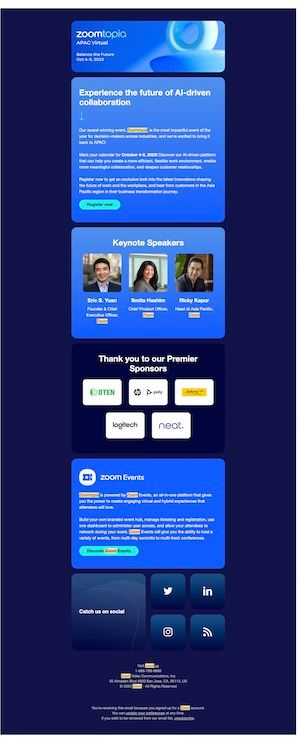
Example 8 : Email Invitation For Event Hosted By Zoom – Zoomtopia

Email invitation for event hosted by Zoom

What I liked about this invitation for event by Zoom

  • Using dark-theme in an email is very tricky, but Zoom has nailed it perfectly
  • Their color palette suits the mood of the event – Notice how the CTA butons complement the background wonderfully
  • The advantage of using dark themes are it allows you to pop your speaker photos and sponsor logos as you can see here
  • Lastly a brilliant CTA for their social media. I often see many of us give very low importance to social media and use it as a footer filler. But here Zoom makes them big action buttons
  • Almost forgot a very subtle way to include their product inline on the email

In conclusion

One thing is clear: a well-crafted event invitation email can make a significant impact on registration rates. As I come across new and inspiring examples of event invitation emails, I will continue to update this article to provide the latest and most effective tips, tricks, and templates for creating successful event invitations.

Keep an eye out for future updates, and don’t forget to subscribe

Dinner Invitation Email: Best Practices, Variations & Templates

Dinner invitations are different from other events. They're more intimate, they require RSVPs and headcount management, and they carry social weight. Whether you're organizing a formal client dinner, a team celebration, or a casual departmental dinner, here's how to make it irresistible.

Why Dinner Invitations Need Extra Care

Dinner events require precise planning: catering counts, dietary restrictions, dress codes, venue logistics. Your email needs to convey warmth and excitement while collecting critical information. A vague dinner invite ("Let's grab dinner sometime") has low RSVP rates. A specific, well-written invite ("Join us for an awards dinner celebrating Q3 wins—cocktails, prime rib, and great company, Tuesday, October 10, 6 PM at The River House") converts.

Dinner Email Best Practices

(1) Be specific about the purpose. Not just "dinner" but "team celebration dinner" or "client appreciation dinner" or "holiday team dinner." 

(2) Include time, location, and dress code. "6 PM - 8:30 PM, The River House, 250 Park Avenue, NYC. Black Tie Optional." 

(3) Mention the menu or cuisine if known: "Italian fine dining" or "farm-to-table seasonal menu" adds appeal. (4) Confirm RSVPs with a hard deadline. "RSVP by Friday, October 6 for catering purposes." 

(5) Ask about dietary restrictions and plus-ones upfront. "Let us know of any dietary restrictions or if you'd like to bring a guest."

Variation 1: Formal Dinner (Client, Awards, Executive)

Subject: You're Invited: Q3 Awards Dinner — October 10

Hi [First Name],

Join our leadership team as we celebrate Q3 wins and announce our biggest deal of the year.

When: Tuesday, October 10, 6 PM – 8:30 PM
Where: The River House, 250 Park Avenue, NYC
Dress Code: Black Tie Optional
Menu: Farm-to-table seasonal menu with wine pairing

This year has been remarkable—and we want to celebrate with the people who made it possible.

Please RSVP by Friday, October 6, so we can finalize catering counts. Let us know of any dietary restrictions or if you'd like to bring a plus-one.

[RSVP Button]

Looking forward to seeing you there.

Best,
[Your Name]


Variation 2: Team Dinner (Casual, Internal)

Subject: Team Dinner — Let's Celebrate! 🎉

Hey [First Name],

We've had an amazing quarter, and we want to celebrate with the team. We're hitting up [Restaurant Name] for good food, good drinks, and great company.

When: Thursday, October 12, 7 PM
Where: [Restaurant Name], [Address]
What to Expect: [Cuisine type], casual vibe, no dress code drama

RSVP so we can get a headcount—and let us know if you have any dietary restrictions.

[RSVP Button]

Can't wait to celebrate with you all.

Cheers,
[Your Name]


Variation 3: Holiday/Seasonal Team Dinner

Subject: Our Annual Holiday Dinner — You're Invited! 🎄

Hi [First Name],

It's time for our favorite tradition: the team holiday dinner. We're gathering on [Date] to enjoy a delicious meal, celebrate the year, and just spend time together (no work talk allowed 😊).

When: [Date], 6 PM – 9 PM
Where: [Venue], [Address]
Dress Code: Smart Casual or Holiday Attire
Menu: [Cuisine] with options for all dietary preferences

Plus-ones are welcome! Just let us know in your RSVP.

[RSVP Button]

We can't wait to see you there.

[Your Name]


Dinner Invitation Email Tips

  • Timing: Send formal dinner invites 3-4 weeks ahead; casual team dinners 2 weeks ahead.
  • Reminders: Send a reminder email 3-5 days before with parking info, coat check details, and a contact number.
  • Dietary: Always ask, even if you think you know someone's preferences (people change, dietary needs change).
  • Plus-ones: Clarify upfront if partners/guests are invited. "Plus-ones welcome" vs. "This event is for team members only."

Virtual Event Invitation Email: Zoom, Webinar & Online Event Best Practices

Virtual events have different challenges than in-person events. Your email needs to: (1) clearly communicate the tech platform, (2) include timezone info, (3) provide technical support details, and (4) overcome the "I'll just attend from home" fatigue. Here's how to get RSVPs and attendance.

Virtual Event Email Best Practices

  1. Name the platform explicitly. Don't just say "online event." Say "Zoom webinar" or "Teams meeting" or "Hopin event." Technical setup varies, and people want to know what they're signing up for. 

  2. Include timezone conversions. If you have attendees across time zones, list the time in multiple zones: "2 PM EST / 1 PM CST / 11 AM PST." 

  3. Provide the link prominently. Put the Zoom link or event URL near the top and bottom of the email, not buried in the middle. 

  4. Add technical support info. "Questions about Zoom? Email support@..." 

  5. Send reminders the day before and 1 hour before. Virtual event no-show rates are 20-30% without reminders.

Variation 1: Virtual Webinar / Online Course

Subject: Free Webinar: How to Plan Events Without Spreadsheets [TOMORROW, 2 PM EST]

Hi [First Name],

You're registered for tomorrow's live webinar: "How to Plan Events Without Spreadsheets." We're excited to see you there!

Webinar Details:
Date: [Date]
Time: 2 PM EST / 1 PM CST / 11 AM PST
Platform: Zoom (video conference)
Duration: 45 minutes + 15 minutes Q&A

Join here: [Zoom Link]

What You'll Learn:

  • Why spreadsheets are slowing down your event planning
  • The #1 mistake event planners make (and how to avoid it)
  • How top companies are saving 10+ hours per event

Can't make it live? Register anyway—we'll send the recording within 24 hours.

Have questions? Reply to this email or contact [support email].

See you tomorrow!

[Your Name]


Variation 2: Zoom Team Meeting / Internal Virtual Event

Subject: Team Sync — This Friday, 2 PM [Zoom Link Inside]

Hi Team,

Quick Friday sync to celebrate wins and align on Q4. 30 minutes, no prep needed.

When: Friday, 2 PM EST
Where: [Zoom Link]
Meeting ID: [123 456 789]
Passcode: [ABC123]

Not sure about Zoom? Download the app free here: [Zoom download link].

See you Friday.

[Your Name]


Variation 3: Virtual Product Launch / Keynote

Subject: SAVE THE DATE: [Product Name] Launch — Live Virtual Event [Register Now]

Hi [First Name],

On [Date], we're launching [Product Name]—and you're invited to the virtual launch event.

Event Details:
Date: [Date]
Time: [Time] EST
Platform: Zoom + live chat

Register here: [Registration Link]

Why Attend:

  • See [Product Name] in action (demo starts at [time])
  • Q&A with [Founder/CEO Name]
  • Exclusive early-bird offer (launch day only)

Technical Details:
You'll receive a Zoom link 24 hours before the event. Join 5 minutes early to test audio/video. No software to install—just click the link.

Questions? Email [support email].

Can't make it live? Register anyway for the recording.

[Your Name]


Virtual Event Email Tips

  • Timezone clarity: Always include multiple timezones if your audience is distributed.
  • Send the Zoom link 24 hours before (not in the initial invite—it reduces spam flags).
  • Reminders matter: Send a reminder 1 day before + 1 hour before. Virtual events have high no-show rates.
  • Provide a phone dial-in number for people with internet issues.
  • Recording note: Always mention the recording will be available after, in case people can't attend live.

Frequently asked questions

  • nclude the essential details your guests need to say yes: event date, time, location (or virtual platform), and a brief description of what they can expect. Add the highlights or key speakers, a clear call-to-action (Register, RSVP, Accept), and always include the venue address (with parking info if relevant), virtual link if applicable, dress code if formal, and who to contact with questions. Avoid burying your CTA. 

    Place your CTA near the top and bottom of the email so busy readers don't miss it.

    For corporate events, also collect dietary restrictions, plus-one information, and accessibility needs. For casual events, keep it lighter and more conversational. The goal is to give people all the info they need without overwhelming them with paragraphs. Use short sentences, bullets, and clear headers.

  • Use these five proven tactics: (1) Keep it short:6-10 words max, as shorter lines get 15-20% higher open rates. (2) Create urgency or exclusivity:use language like "Last 3 Days to Register" or "You're Invited: VIP Only" to trigger FOMO. (3) Include a specific number or benefit:"5 Things You'll Learn at..." outperforms generic hooks like "Join Us." (4) Personalize with first name:[First Name], come see what's new" sees a 26% open rate boost. (5) Use emojis sparingly:only if they match your event tone (professional events: minimal; fun events: go wild).

    Test your subject lines before sending to your entire list. A/B testing different subject lines. Even small tweaks like "Register" vs. "Secure Your Spot" can shift your open rate by 5-10%. Track what works, and use those patterns for your next event.

  • Formal invites (corporate events, client dinners, awards dinners) use a professional tone with full sentences, specific dress code requirements, a detailed agenda, and a hard RSVP deadline with consequences for late replies. Informal invites (team lunches, office celebrations, social events) use casual language, short sentences, emojis, optional or flexible dress codes, and a relaxed RSVP timeline:"We'd love to see you, no pressure."

    The key difference: formal events require confirmation and planning (you need headcounts, catering counts, seating charts); informal events are "come if you can." Match your tone to your audience. If you're inviting C-suite executives or clients, go formal. If you're inviting your team to a casual team lunch, keep it fun and light. Mismatched tone damages your credibility.

  • Add a clear line: "Please let us know of any dietary restrictions or allergies by [DATE]. We want to make sure there's something delicious for everyone." Collect this info via an RSVP form, Google Form, or reply-to email. For corporate events, dietary restrictions are non-negotiable—they're part of inclusive event planning and may have legal implications if you're catering to a diverse workforce. List common options (vegetarian, vegan, gluten-free, halal, kosher, nut allergies) and make selection easy. Checkboxes beat open text fields.

    Don't assume or generalize ("I'll just order vegetarian for everyone"). Ask every time, even if you've hosted events for these people before. Preferences change, and you want attendees to feel welcomed. Sync dietary info to your catering partner or event app so nothing gets lost in the shuffle.

  • For most events, send the first invite 2-3 weeks in advance. This gives people time to clear their calendar and register. If you need RSVPs, include a deadline that's 5-7 days before the event (gives you time to finalize numbers with catering/venue). For surprise events or exclusive VIP events, 1-2 weeks is fine. For webinars or virtual events, 1 week before is sufficient.

    Send a reminder email 2-3 days before to people who registered but haven't confirmed. Many planners see a 10-15% attendance boost from reminders alone. For virtual events, send a final reminder 1 hour before the event starts, with the Zoom/Teams link and a "See you soon!" tone. Timing matters - too early and people forget, too late and they've already made other plans.

  • Start with a hook, not a generic greeting. Instead of "Dear [Name], We're hosting an event," try one of these proven openers: (1) Problem statement: "Struggling to plan events as a first-time planner? Here's your answer." (2) Benefit: "Want to learn the #1 mistake event organizers make?" (3) Curiosity: "Guess who's speaking at our summit this year?" (4) Exclusivity: "You're one of 50 people invited to..." The opening line determines whether busy people keep reading or delete. Make it about them, not about you.

    Avoid "save the date" openers without context. Instead of "Save the Date," say "Join 500+ marketers for the industry's biggest networking event on October 15." Lead with what's in it for them, and you'll see higher engagement.

  • Open with the specific purpose of the dinner (client relationship building, team celebration, awards dinner—be explicit). State the date, time, location, and dress code clearly. Mention who else is attending—"Join our leadership team and top partners for..." creates credibility and FOMO. Include the menu or cuisine type if known ("Italian fine dining at..."). End with a warm CTA: "We'd love to have you. RSVP by [DATE]."

    Avoid generic language. Instead of "You're invited to a dinner," say "Join us for a celebration of Q4 wins—craft cocktails and prime rib at The River House, 6 PM Tuesday, October 10." Be specific about dress code (Black Tie, Business Casual, Smart Casual) and mention parking or valet info if it's at a tricky venue. The more details, the fewer follow-up questions you'll get.

  • No. Sending a mass, one-size-fits-all invite drops open rates by 20-30%. At minimum, personalize the greeting and opening line. Segment your list: external guests vs. internal employees, VIPs vs. regular attendees, previous attendees vs. first-timers. Each segment needs a slightly different angle. VIPs might get "Join us for an exclusive evening with industry leaders," while first-timers get "Join 500+ professionals for the networking event of the year."

    Personalization doesn't mean custom-writing each email—use simple variables like [First Name], [Company], [Previous Event Attended]. A prospect who attended your last event is more likely to register if your invite says "You were amazing at our June summit—come back in October." Generic invites feel like spam; personalized invites feel like an actual invitation.

  • Avoid generic CTAs like "Register Now" or "Learn More." Instead, use benefit-driven language: "Secure Your Spot," "Get Early-Bird Pricing," "Reserve Your Seat (Only 10 Left)," or "Yes, I'm Coming!" The CTA should appear at least twice—once early in the email (after the hook) and once at the bottom (after all details). Make the button visually distinct with a contrasting color and padding.

    Test different CTA wording: formal events respond to "Reserve"; casual events respond to "Yes, I'm In!" or "See You There!" A/B test your CTAs if possible. Button color matters too—bright, contrasting colors (not matching your brand color) get 20-30% higher clicks. Measure which CTA gets the most clicks and use that pattern for your next event.

  • Send a reminder email 5-7 days after the first invite. Keep the tone light and friendly: "Still thinking about it? We'd love to see you at the [Event Name] on [Date]!" Include the key details again (date, time, registration link), a short testimonial from a past attendee, and a new deadline ("RSVP by Friday for the early-bird discount"). If it's a paid event, mention that early-bird pricing or limited tickets are running out.

    Send a final reminder 2 days before the event to people who registered but haven't confirmed attendance (especially critical for virtual events—no-show rates are 20-30% without reminders). For virtual events, send one more reminder 1 hour before with the Zoom/Teams link. Three touchpoints (initial invite, reminder, final reminder) is standard. More than that feels spammy.

  • Use images strategically, not decoratively. Include: (1) Speaker headshots—so attendees know who's talking and feel connected to the event. (2) Venue photo—so the event feels real and location-specific. (3) Event logo or branding—so it's instantly recognizable. Avoid image-only layouts (not mobile-friendly), decorative borders, or too many GIFs (they look unprofessional). Keep images under 3 per email and keep total file size under 100KB for fast loading on mobile.

    Videos should be linked, not embedded in email—link-through-to-video tracking is measurable, and embedded videos don't play in most email clients anyway. Always include alt-text for all images for accessibility. Images boost engagement by 10-15%, but only if they're relevant. A random decorative image? Skip it. A photo of the venue or a speaker? Include it.

  • Include: (1) Your name and title, (2) Company name, (3) Email, (4) Phone number, (5) Event website link (optional), (6) Social media handles (optional). For corporate events, keep it minimal and professional—5 lines max. For casual or fun events, you can add a tagline or light emoji. Don't overload; keep the signature scannable. Make sure the phone number actually works if people want to call with questions or dietary needs.

    If you're a team, sign with the lead event organizer's name only. Not "The Marketing Team" or "Everyone." Personalization wins. If attendees have a question or concern, they want to know they're reaching a real person, not a black hole.